Journaling apps compared

Apps that turn your journal into one small action for tomorrow

Yes. Journal Ninja returns one next step after each entry, and Dayora's replies can end with one small thing to try. Juno and Zenora turn your entries into small goals, and Reflection suggests growth opportunities. All five are available now. Leeway is a new voice journal opening on iPhone in mid-November 2026: you talk for a couple of minutes, and it keeps one small step for tomorrow.

By the Leeway team · Checked against 12 sources · Updated October 20, 2026

Writing down a hard day can help you see it. Knowing what to do about it the next morning is a different job, and only some journals try. This page compares five apps that turn what you write or say into something to do, and looks at how small that thing is, when it arrives, and whether it is still there the next day.

Leeway is new and opens on iPhone in mid-November 2026, with no price announced yet. We build it, so it comes first as the newcomer, described only by what it is designed to do. The other five can be used today. Their facts come from their own sites and store pages, read on October 20, 2026, and the table says when a page was silent on something.

The picks

  1. Leeway

    Best for talking through your evening and leaving with one small step

    Leeway is new and opens on iPhone in mid-November 2026, with no price announced yet. You answer one evening question out loud, or in writing, and it draws one small step for tomorrow from what you said. You can try it, swap it or set it aside. It waits on Today in the morning, and in the evening Leeway asks how it went.

    Leeway is built around one evening question. You talk for a couple of minutes, or write, and it gives the evening a short title, shows your emotional reserve and your mental load, draws a map of how the evening moved, keeps a reflection in your own words and suggests one small step for tomorrow. In the morning, the step and last night's scores wait on Today. Over the weeks, Follow-up and Patterns show what weighs on you and what helps.

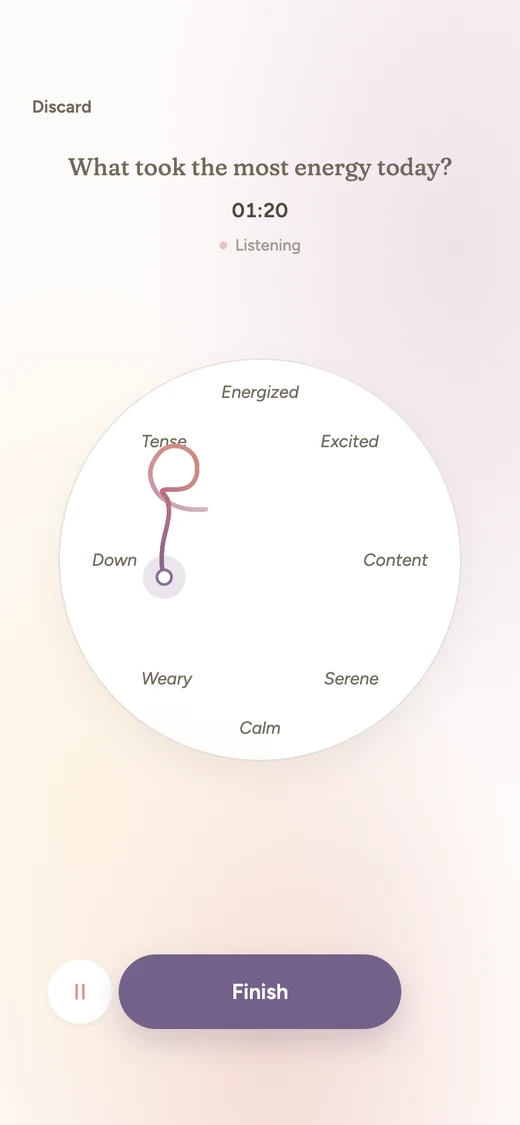
    Recording in Leeway: the question at the top, a timer, and the path of the voice drawing across the emotion map.
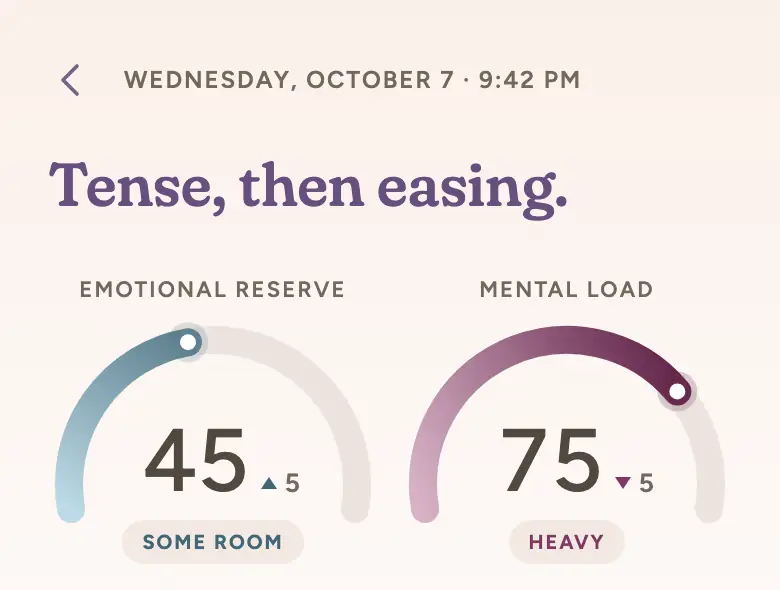
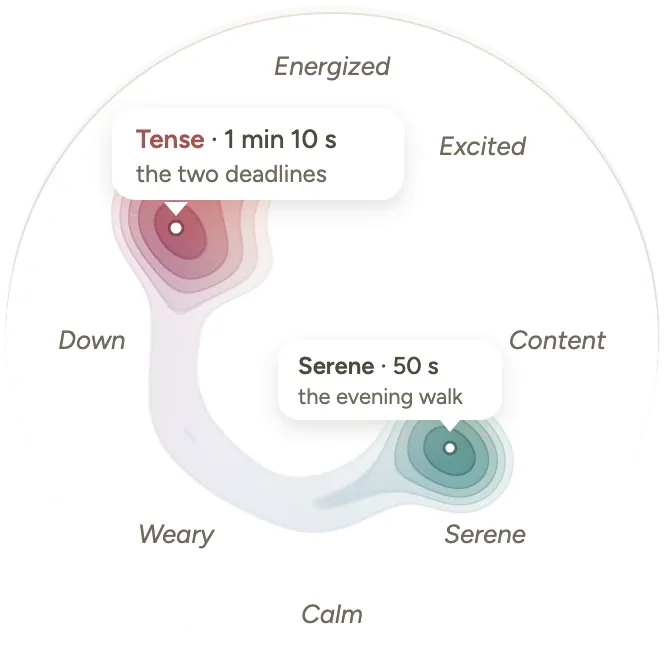
    Tense, then easing. Emotional reserve 45, some room. Mental load 75, heavy.The map of the evening: Tense, 1 min 10 s, the two deadlines. Serene, 50 s, the evening walk.
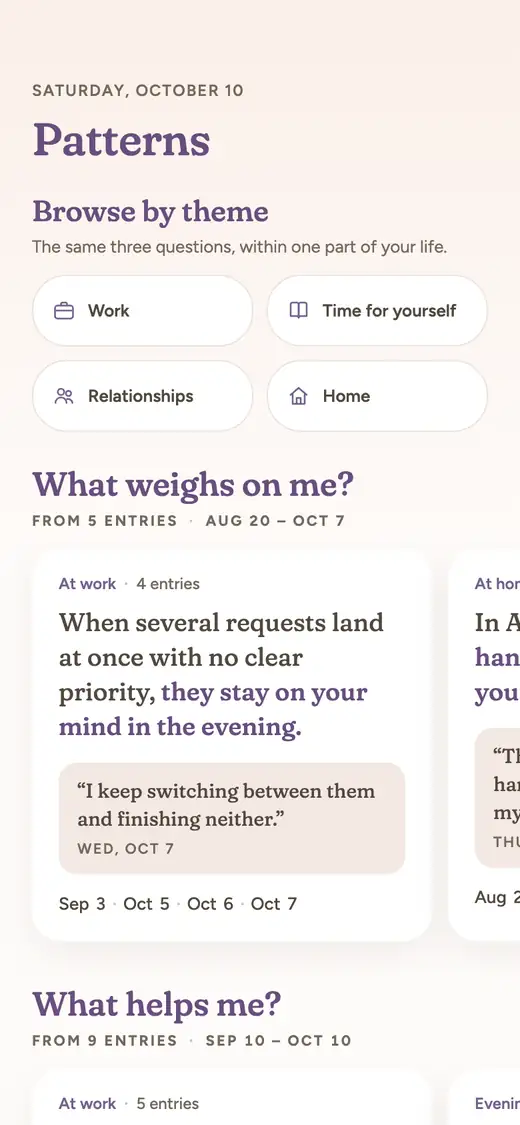
    Patterns: browse by theme, then what weighs on me and what helps me, in your own words and dates.

    Designed screens, before launch. Example entry.

    Good at

    • Built for talking: one question, a couple of minutes, no blank page; writing works too
    • Names what you felt from your voice and your words, and you can correct it
    • Two scores that move from one entry to the next: emotional reserve and mental load
    • A map of the evening that shows where the feeling went and for how long
    • One small step for tomorrow, waiting in the morning, with a check-in the next evening
    • Patterns answers what weighs on you and what helps, with your own words and dates, and says so when there is not enough to tell

    Keep in mind

    • Not released yet: it opens on iPhone in mid-November 2026, with a waitlist
    • Price not announced yet
    • Made for short evening check-ins, not long written diaries, photos or travel logs
  2. Journal Ninja

    Best for one next step after every entry, plus a daily mission

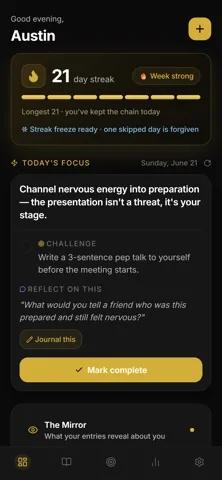
    Journal Ninja is a writing journal aimed at personal growth. When you save an entry, its AI returns a structured reflection with your emotions, key themes and one next step. Each day also brings a mission, a challenge and a reflection question drawn from your recent entries and goals.

    Journal Ninja screenshot from its App Store listing

    From Journal Ninja’s App Store listing.

    Good at

    • The next step arrives right after each entry, the closest match on this page to the question it answers
    • Daily missions and goals broken into milestones keep the action side going between entries
    • You can speak an entry instead of typing, and edit the transcript
    • Pro is inexpensive on the US App Store: $1.99 a month, $14.99 a year or $99.99 once

    Keep in mind

    • It leans on goals, scores and momentum: weekly reviews rate your week from 0 to 100, which suits a growth plan more than a quiet evening
    • Very new: released in July 2026, on Apple devices only for now, with Android listed as coming soon
    • Its site says the free plan includes 2 AI insights a day
  3. Dayora

    Best for a free browser journal whose replies can end with one small thing to try

    Dayora is an AI journal that runs in the browser. You write a line or a page, or speak, and it replies to every entry with what it heard and, when it fits, one small thing to try or a question to keep going. Its site says a vent is heard without advice and a big decision stays yours.

    Good at

    • The free core includes unlimited entries, a reply to every entry, voice journaling and mood tracking
    • It holds back when advice does not fit, so a suggestion appears only when there is room for one
    • It works in any browser, on any device, with nothing to install
    • On Plus, the morning after a heavy entry brings a short letter with a section for today's focus

    Keep in mind

    • No App Store or Google Play app; it lives in the browser
    • Voice calls and the morning letter need Plus, at $9 a month or $72 a year
    • Outside the Plus morning letter, the small thing to try stays inside that entry's reply
  4. Juno

    Best for small steps drawn from patterns in your own words

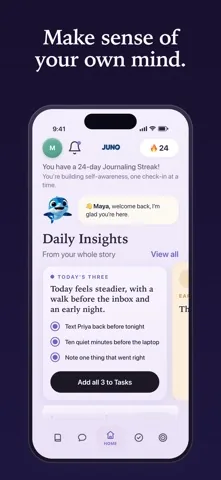
    Juno is an AI journal for iPhone. You write or talk, it looks for patterns in your entries, such as what lifts you and what drains you, and its App Store page says it then offers one small step you can actually take. On its site, the monthly review ends with a small step for the month ahead.

    Juno screenshot from its App Store listing

    From Juno’s App Store listing.

    Good at

    • Its App Store description puts one small step, drawn from your own words, at the center
    • Tap the mic and it transcribes as you speak; the companion chat takes voice or text
    • A one-tap mood check-in with twenty moods to choose from
    • Its listing says entries are encrypted and never used to train AI models

    Keep in mind

    • Writing new entries and every AI feature require Premium after a 14-day free trial: $4.99 a week, $19.99 a month or $119.99 a year on the US App Store
    • iPhone only and English only, with one rating on its US App Store page
    • The small step shown on its site sits in the monthly review, as a habit for the month rather than for tomorrow
  5. Zenora

    Best for goal drafts you review yourself, alongside mood check-ins

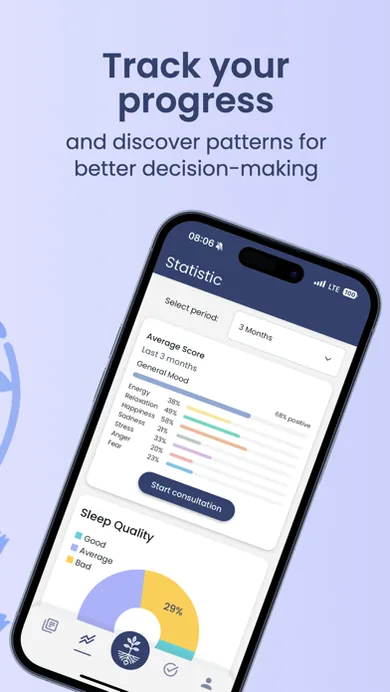
    Zenora combines short check-ins, an AI companion and guided pauses. When you reflect on an entry or a stretch of days, you can ask it to turn what you found into a goal draft. It only prepares the draft; you change it and decide whether to save it.

    Zenora screenshot from its App Store listing

    From Zenora’s App Store listing.

    Good at

    • Nothing is saved without you: every goal starts as a draft you review
    • A check-in takes about a minute, with as many or as few questions as you like
    • Insights compare a week or a month with the one before, across mood, energy and stress
    • Short guided pauses for breathing and grounding, spoken in six languages

    Keep in mind

    • Its site does not mention voice entries; you check in and write a note
    • Its US App Store page lists ads and a Premium purchase at $8.99, without saying what Premium covers
    • Goals come when you ask for them, so a step is not offered after every entry
  6. Reflection

    Best for a free, long-running journal whose Insights page suggests ways to grow

    Reflection is a guided journal with an AI coach. You write, dictate or start a Voice Call, and the coach answers with a follow-up question. Since version 6.28, its Insights page also offers personalized growth opportunities grounded in what you have written.

    Reflection screenshot from its App Store listing

    From Reflection’s App Store listing.

    Good at

    • A free-forever plan with unlimited entries, prompts and monthly and annual reviews
    • Runs on iPhone, iPad, Mac, Android and the web, with sync across devices on Premium
    • Templates for gratitude, goals and more let you plan in the same place you reflect
    • Insights chart sentiment over time and an emotional landscape by energy and positivity

    Keep in mind

    • Growth opportunities live on the Insights page rather than arriving as a step after each entry
    • Its pages do not say which plan includes growth opportunities
    • AI insights and writing support are unlimited only on Premium, at $8 a month or $5.75 a month billed yearly

The Leeway experience

Leeway is designed to ask almost nothing of you at the end of a long day: no blank page, no form to fill, no list of emotions to scroll. You open it, answer one question out loud, and it does the sorting. What comes back is short to read and rich in what it shows: a name for the evening, two scores, a map, your own words and one step.

  1. Leeway's Today screen in the evening: What took the most energy today? A record button, and Write instead.

    Evening · 1 tap

    Open, then talk

    Today shows one question and one big record button. Writing works too, one tap away.

  2. Recording in Leeway: the question at the top, a timer, and the path of the voice drawing across the emotion map.

    A couple of minutes

    Say it your way

    No script to follow, no right way to say it. Your path across the emotion map draws as you speak.

  3. Tense, then easing. Emotional reserve 45, some room. Mental load 75, heavy.The map of the evening: Tense, 1 min 10 s, the two deadlines. Serene, 50 s, the evening walk.

    Right after

    See what it was

    A title for the evening, your emotional reserve and mental load, the map and a reflection in your own words. You can correct what it named.

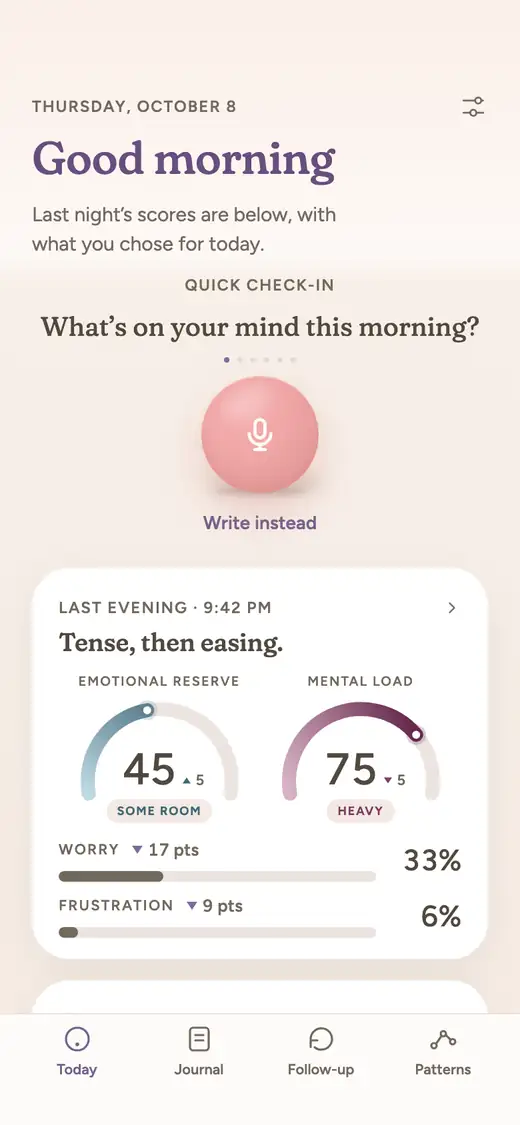
  4. Today in the morning: last night's scores and the step you chose, with a quick check-in.

    Next morning

    Pick up where you left off

    Last night's scores and the one step you kept wait on Today. In the evening, it asks how it went.

Designed screens, before launch. Example entry.

At a glance

LeewayJournal NinjaDayoraJunoZenoraReflection
How you journalAnswer one evening question out loud for a couple of minutes, morning or evening. Writing works too.Write morning and evening entries with guided prompts, or speak them.Write a sentence or a page, or speak your entry.Write or speak a quick reflection; prompts come from your recent entries.Answer a few check-in questions and add a note in your own words.Write, dictate, or start a Voice Call. Templates and prompts are included.
VoiceVoice first. Talking is the main way to make an entry.Voice input with real-time, editable transcription.Voice journaling in the free core; voice calls with Plus.Voice entries transcribed as you speak, and a chat by voice or text.Not described for entries; spoken guidance in the breathing and grounding pauses.Dictation, and a Voice Call that talks back on iPhone, iPad and Android.
What you get after an entryA title for your evening, your emotional reserve (the room you have left), your mental load (what is still turning), and a reflection in your own words.A structured reflection: emotions, key themes, action items and one next step.A reply to every entry, which can include one small thing to try or a question to keep going.Patterns across your entries and a companion that remembers what you shared.Reflect on an entry or a period with an AI companion that can draw on your entries and goals.A coach question drawn from the entry.
Naming emotionsAn AI names the emotion in your voice and in your words. You do not have to name anything, and you can correct it.The AI reflects the emotions in each entry; you can add a mood and tags.One-tap mood tracking on a five-point scale from Rough to Great.A one-tap check-in with twenty moods, and mood shifts linked to sleep, people and words.Check-ins with a mood slider and feelings, tracking mood, energy and stress.Sentiment over time and an emotional landscape on the Insights page.
Over timeFollows your reserve and load from one entry to the next. After a few weeks, Patterns shows what weighs on you and what helps, and says so when there is not enough to tell.The Mirror shows patterns over weeks and months, with weekly reviews and letters from a future you.Patterns across entries, Reflect conversations, an editable AI memory and Your Circle for the people you mention.Weekly patterns and a monthly review told back as a story.Insights that compare a week or a month with the one before.Insights with life domains and themes, plus monthly and annual reviews.
Something to do nextOne small step for tomorrow, drawn from what you said. Try it, swap it, or set it aside. It waits for you in the morning.One next step after each entry, plus a daily mission and goals with milestones.One small thing to try, when it fits. Plus adds a morning letter with today's focus after a heavy day.One small step drawn from your patterns, and goals built from your own words.Goal drafts on request, from a conversation or your insights, which you review and save.Personalized growth opportunities on the Insights page. A single step for tomorrow is not described.
PlatformsiPhone first.iPhone, iPad and Macs with Apple silicon. Android is listed as coming soon.Web, in any browser.iPhone.iPhone, iPad, Apple Watch and Android.iPhone, iPad, Mac, Android and web.
PriceNot announced yet.Free plan with daily limits. Pro is $1.99 a month, $14.99 a year or $99.99 lifetime on the US App Store.Free core. Plus is $9 a month or $72 a year, or $6 a month for people who join before November 1, 2026.14-day free trial, then Premium at $4.99 a week, $19.99 a month or $119.99 a year.Free to download. Premium is listed at $8.99 on the US App Store; its site says prices vary by region.Free plan. Premium is $8 a month, or $5.75 a month billed yearly, with a 7-day free trial.
AvailabilityNot released yet. Waitlist open.Available now on the App Store.Available now on the web.Available now on the App Store.Available now on the App Store and Google Play.Available now on the App Store, Google Play and the web.

Talk first, then the step

You answer one evening question out loud for a couple of minutes, or write if you prefer. The step comes from what you said that evening, not from a template or a list of goals you set up beforehand.

Recording in Leeway: the question at the top, a timer, and the path of the voice drawing across the emotion map.

One step that waits for the morning

Several apps here build goals, milestones or missions. Leeway keeps it to one small step for tomorrow, so there is nothing to manage. Try it, swap it or set it aside; it waits on Today in the morning, and that evening Leeway asks how it went.

Today in the morning: last night's scores and the step you chose, with a quick check-in.

The evening behind the step

Before the step, Leeway names what you felt, from your voice and your words, and shows your emotional reserve and your mental load. A step is easier to judge when you can see the evening it came from.

Tense, then easing. Emotional reserve 45, some room. Mental load 75, heavy.The map of the evening: Tense, 1 min 10 s, the two deadlines. Serene, 50 s, the evening walk.

What helps, after a few weeks

Over time, Patterns shows what weighs on you and what helps, in your own words and with dates, and says so when there is not enough to tell.

Patterns: browse by theme, then what weighs on me and what helps me, in your own words and dates.

Leeway’s designed screens, before launch. Example entries.

Which one to choose

Choose Journal Ninja, Dayora, Juno, Zenora or Reflection if

You want to start today. Journal Ninja gives a next step after every entry and a daily mission, Dayora replies with one small thing to try for free in the browser, Juno draws small steps and goals from your patterns, Zenora drafts goals only when you ask, and Reflection pairs a free plan with growth opportunities on its Insights page.

Choose Leeway if

You would rather talk than write at the end of the day, and you want a single step for tomorrow that is still there in the morning, next to last night's reserve and load. Leeway is not out yet: join the waitlist for one email when it opens on iPhone.

Questions

Is there an app that turns my journal entries into one small action for tomorrow?

Yes. Journal Ninja gives one next step after each entry, Dayora's replies can include one small thing to try, and Juno and Zenora turn entries into small goals. Leeway, opening on iPhone in mid-November 2026, draws one small step for tomorrow from what you said and keeps it for the morning.

Why one small step instead of a full plan?

A small step asks less of a tired evening and is easier to try the next day. A full plan can be useful, but it is one more thing to keep up with. Several apps here offer both: a step after an entry, and goals for the longer run.

Which of these apps are free?

Dayora's core is free in the browser, Reflection has a free plan, and Journal Ninja has a free plan with daily limits. Zenora is free to download with a Premium purchase, and Juno needs Premium for new entries after a 14-day trial. Leeway's price is not announced yet.

Can I talk instead of writing?

In most of them. Journal Ninja, Juno and Dayora accept spoken entries, and Reflection offers dictation and a Voice Call. Zenora's site does not mention voice entries. Leeway is built for talking, with writing as an option.

Is Leeway available yet?

Not yet. Leeway opens on iPhone in mid-November 2026, with no price announced. Join the waitlist and you will get one email when it opens.

Leeway · AI voice journal for iPhone

Start with one evening.

Leeway's Today screen in the evening. Tonight's journal asks: What took the most energy today? A record button, and Write instead below it.
Leeway's Today screen, before launch.

Leeway is a voice journal for iPhone, opening in mid-November 2026. Answer one evening question out loud for a couple of minutes, and it names what you felt, shows your emotional reserve and mental load, and draws one small step for tomorrow that waits for you in the morning.

One email when Leeway opens on iPhone. Nothing else.

You're on the list.

One email when Leeway opens on iPhone. Nothing else.

Wrong address? Use another one

More comparisons

Sources

We checked this page against these references. They are not affiliated with Leeway and do not endorse it.

  1. Journal Ninja - AI Journal App for Personal GrowthJournal Ninja
  2. Journal Ninja on the App StoreApple App Store
  3. Dayora: Free AI Journaling App That Writes BackDayora
  4. Juno — Make sense of your own mind.Juno
  5. Juno: AI Journal, Mood Tracker on the App StoreApple App Store
  6. Zenora — AI Journal App, Mood Tracker & Self-ReflectionPyrabit
  7. Zenora: AI Journal & Self-Care on the App StoreApple App Store
  8. Zenora: AI Journal & Self-Care - Apps on Google PlayGoogle Play
  9. Upgrade to Premium | Reflection Guided Journaling App OnlineReflection
  10. The All-New Insights Page - Reflection changelogReflection
  11. Voice Call | ReflectionReflection
  12. Reflection: AI Journal & Coach on the App StoreApple App Store