Journaling apps compared
Best AI journal apps
Rosebud is the most AI-centered journal here, Reflection is the one to try free, and Mindsera centers on emotion analysis. Life Note replies as historical mentors, and Day One keeps AI optional. Leeway is new and opening soon on iPhone, with an AI that names what you felt from your voice. Join the waitlist.
AI journaling covers a lot of ground: a coach that asks a question, a memory that links your entries, a report on your week, or a thinker who writes back. This list compares five apps you can use today on what the AI does after you write, what it shows over time, and what it costs.
Leeway is new and opening soon on iPhone, with no date or price announced yet. We build it, so it appears first as the newcomer to watch. Its approach is different: the AI listens to you talk, names what you felt, and leaves you with one small step. Facts about the others come from their own sites and App Store pages, checked on October 17, 2026.
The picks
Leeway
Best for talking through your evening and leaving with one small step
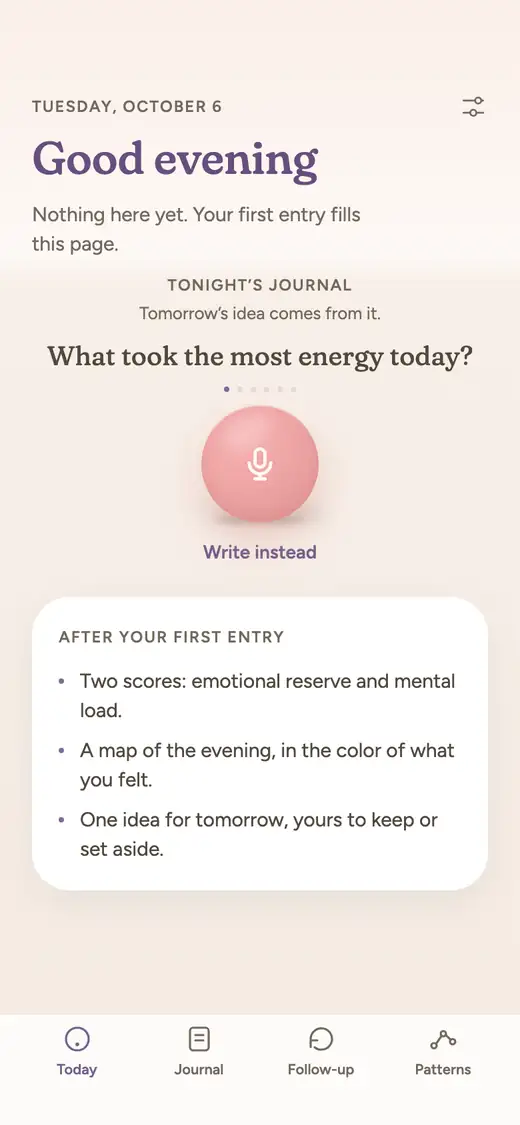
Leeway is new and opening soon on iPhone, with no date or price announced. Its AI listens to your answer to one evening question and names the emotion in your voice and words, which you can correct. It then shows your emotional reserve and mental load, gives a reflection in your own words, and keeps one small step for tomorrow.
Rosebud
Best for an AI-centered journal that remembers your history and answers as you go
Rosebud is built around its AI. After each entry it reflects key insights back to you, asks follow-up questions, and draws on a long-term memory of earlier entries. Once a week it summarizes themes, mood trends and the people you wrote about.
Good at
- AI is the core of the product: entry reflections, questions and a memory that carries across days
- The weekly report lists writing stats, an emotional landscape, recurring themes and a cast of people from your entries
- Guided and custom journals, a morning intention and an evening reflection give the AI regular material
- Personalized prompts help on evenings when you do not know where to start
Keep in mind
- Its help center says the free plan is retired effective September 30, 2026, though its home page still says Rosebud is free to use
- It presents itself around personal growth and emotional support, with goals, habits and reports beyond journaling
- Reports arrive weekly; one small step for the following morning is not described
Reflection
Best for an AI journal you can try free, on every device you own
Reflection pairs a clean editor with an AI Coach that asks a follow-up question taken from the entry you just wrote. An Insights page charts sentiment, and Ask Your Journal answers questions about your history in plain language.
Good at
- A free plan covers unlimited entries, prompts, reviews and import or export; Premium adds unlimited AI writing support and AI-enhanced search
- Its site states entries are encrypted with AES-256 at rest and never used to train AI models, even on the free plan
- A Reflection MCP connection lets you read and write your journal from Claude, ChatGPT and other assistants
- More than 100 guided journeys created with wellness and personal growth experts, with the full library on Premium according to its FAQ
Keep in mind
- Coaching arrives as a follow-up question after you write; it does not set an action for tomorrow
- The Insights page shows sentiment and an emotional landscape, but naming a feeling for you from your voice is not described
- Unlimited cross-device syncing is part of Premium, while the free plan lists limited syncing
Mindsera
Best for analysis: emotion detection, recurring topics and a chat with your journal
Mindsera reads each entry and returns a breakdown of themes, emotions and takeaways, then looks across your whole journal for patterns. You write, speak or scan handwriting, and a companion asks questions that draw on what you wrote before.
Good at
- Emotion analysis, listed as based on Plutchik's model, shows how feelings shift across weeks, months and seasons
- Ask Your Journal, recurring topic detection and a Big Five personality profile give you several ways to read your own entries
- More than 50 framework templates are included in the free Curious plan
- The paid plan adds voice mode, a spoken call mode, and a scan of handwritten pages
Keep in mind
- Its analysis tools, voice mode and call mode are on the paid Genius plan; the free Curious plan covers basic journaling and templates
- Its FAQ says the AI features are optimized for English
- It is organized around analysis and frameworks, not around one evening question
- Suggestions are nudges based on your entries over time; a single step tied to the night you just journaled is not described
Life Note
Best for replies from AI mentors modeled on thinkers you admire
Life Note answers each entry in the voice of a mentor inspired by a thinker such as Carl Jung or Marcus Aurelius, chosen from more than 1,000. Mentors remember earlier entries, keep chatting when you ask, and send a weekly letter.
Good at
- A distinctive format: replies grounded in what the thinker actually wrote, with several mentors per entry on Premium
- Mentors recall earlier entries, and you can chat with your journal about patterns
- Voice dictation is offered, and mood tracking and gratitude journaling are listed in its App Store description
- Free accounts get 10 entries with a mentor reply in the first week, then 3 a week
Keep in mind
- Feedback arrives as a mentor's reply; a feeling named from your voice, or a measure of how much room you have left, is not described
- After the first week the free plan caps mentor replies at three entries a week
- A daily prompt from your mentor is described; one step chosen from that evening's entry is not
Day One
Best for adding optional AI to an established, full-featured journal
Day One is a journal first and an AI product second. Its AI tools are bundled in the Gold plan: Daily Chat for guided reflection, Go Deeper prompts, entry summaries and title suggestions.
Good at
- AI stays optional: the free Basic plan keeps unlimited text entries, a prompt library and end-to-end encryption
- Daily Chat, which you can type or speak through its Voice Mode, and Go Deeper prompts turn reflection into a guided conversation on Gold
- Templates, reminders and printed books make it a keepsake journal as well as a reflection tool
Keep in mind
- The AI tools need the Gold plan, and its FAQ says they carry daily usage limits
- The AI is summaries, prompts and chat with a memory of what you share; naming a feeling from your voice is not described
- Nothing in the plans suggests a step for tomorrow
At a glance
| Leeway | Rosebud | Reflection | Mindsera | Life Note | Day One | |
|---|---|---|---|---|---|---|
| How you journal | Answer one evening question out loud for a couple of minutes, morning or evening. Writing works too. | Write or speak into guided journals, a morning intention or an evening reflection. | Write or dictate in a minimalist editor, with templates and guided journeys. | Write, speak or scan handwritten pages, using framework templates and morning and evening rituals. | Write an entry and a mentor replies; dictation turns speech into text. | Write with photos, video, drawings and audio; templates and a prompt gallery are included. |
| Voice | Voice first. Talking is the main way to make an entry. | Voice transcription and a hands-free voice mode. | Dictation and a spoken Voice Call are both described. | Voice mode transcribes speech and call mode talks back, both on the Genius plan. | Voice dictation transcribes your words into the entry. | Audio and transcription come with Silver. Gold's Daily Chat has a spoken Voice Mode. |
| What you get after an entry | A title for your evening, your emotional reserve (the room you have left), your mental load (what is still turning), and a reflection in your own words. | A summary and reflection of each entry, follow-up questions, and a weekly written report. | A coach question from your entry, plus weekly and monthly reviews. | An AI breakdown of themes, emotions and takeaways, plus summaries and generated artwork. | A mentor reply, a Weekly Letter, an Inner Portrait and a weekly piece of art. | Gold adds Daily Chat, Go Deeper prompts, summaries and title suggestions. |
| Naming emotions | An AI names the emotion in your voice and in your words. You do not have to name anything, and you can correct it. | AI mood tracking is listed, and the weekly report includes an emotional landscape. | Sentiment over time and an emotional landscape on the Insights page. | Detects emotions in your writing and charts them over time. | You can log your mood and gratitude, and its site describes an emotion weather map of your feelings over time. | No emotion feature on its plans page. Its Gold page says Daily Chat entries capture your words and mood. |
| Over time | Follows your reserve and load from one entry to the next. After a few weeks, Patterns shows what weighs on you and what helps, and says so when there is not enough to tell. | Long-term memory links entries, and the report follows themes week to week. | Insights across any date range, journal-wide search, and periodic reviews. | Long-term emotion analysis, recurring topics, a story view and a Monday review email. | Mentors link today's entry to past ones, and you can chat with your journal. | On This Day memories, search and filters, and on Gold a Daily Chat memory of what you share. |
| Something to do next | One small step for tomorrow, drawn from what you said. Try it, swap it, or set it aside. It waits for you in the morning. | AI habit and goal suggestions. | Growth opportunities on the Insights page, plus coach questions. A single step for the next day is not described. | Personalized suggestions from your entries. | A daily prompt written by your mentor. | Daily prompts and reminders. No suggested action after an entry is described. |
| Platforms | iPhone first. | iPhone, iPad, Android and web. | iPhone, iPad, Mac, Android and web. | iPhone, Android and web. | iPhone, Android and web. | iPhone, iPad, Mac, Apple Watch, Android, Windows and web. |
| Price | Not announced yet. | $12.99 monthly or $107.99 yearly for Rosebud Bloom, per its home page. | Free forever plan. Premium runs $8 monthly, or from $5.75 a month on the yearly plan; a 7-day trial is offered. | Curious is free. Genius is $14.99 monthly, or $10.75 a month billed at $129 yearly. | Free to start. Premium is $10.99 monthly or $99.99 yearly in the US. | Basic $0, Silver $49.99 per year, Gold $74.99 per year; a free month is offered in the app. |
| Availability | Not released yet. Waitlist open. | Available now on the App Store, Google Play and the web. | Available now on the App Store, Google Play and the web. | Available now; a free trial is offered. | Available now. | Available now on iPhone, Android, Mac, Windows and the web. |
Why Leeway is first on our list
An AI that listens as well as reads
Several apps listed here accept speech, through dictation or a spoken chat, and their AI then works from the words. Leeway starts from a spoken answer to one evening question, a couple of minutes long, and its AI reads both your voice and your words. Writing is available if you prefer it.
Feelings named, then followed
Rather than reporting sentiment or asking you to log a mood, Leeway's AI names the emotion and you can correct it. Each entry then moves two numbers: your emotional reserve, the room you have left, and your mental load, what is still turning.
A reflection in your own words
The reflection Leeway returns is built from what you said, in your own words, rather than in the voice of a coach or a mentor. It comes with a title for your evening, so the entry has a name you can find again.
AI that ends in an action
Summaries and prompts elsewhere end as text to read. Leeway ends with one small step for tomorrow, drawn from what you said, which waits for you in the morning. After a few weeks Patterns shows what weighs on you and what helps, and says so when there is not enough to tell.
Which one to choose
Choose Rosebud, Reflection or Mindsera if
You want an AI that works through your writing today. Rosebud offers memory and a weekly report, Reflection has a free plan and syncs across devices, and Mindsera centers on emotion and topic analysis on its paid plan. Life Note suits readers who want advice in a thinker's voice, and Day One suits people who want a classic journal with AI as an optional extra.
Choose Leeway if
You would rather talk for a couple of minutes than write, and you want the feeling named, your reserve and load shown, and one small step for tomorrow. Leeway is not out yet. Join the waitlist and you will get one email when it opens on iPhone.
Questions
What is the best AI journal app?
It depends on what you want the AI to do. Rosebud centers on reflections and memory, Reflection offers a coach and a free plan, Mindsera analyzes emotions and topics, Life Note writes back as a mentor, and Day One adds AI on its top plan. Leeway is not released yet and is built around speaking.
Which AI journal apps are free?
Reflection has a free plan, with Premium at $8 a month. Mindsera has a free Curious plan, and Life Note is free to start with weekly limits. Day One's free Basic plan has no AI tools, which begin at Gold. Rosebud's help center says its free plan is retired effective September 30, 2026.
Do AI journal apps train on my entries?
Reflection, Mindsera and Life Note each say on their site or App Store page that entries are not used to train AI models, and Day One says the same for its Daily Chat. Rosebud's privacy policy says it has zero data retention agreements with its AI providers, which discard data after processing. Read the privacy policy of any app before you write something personal.
Can an AI journal replace professional support?
No. These apps are tools for reflecting on your day, and Rosebud and Mindsera both say on their pages that they are not a substitute for professional care. If you are struggling, a qualified professional is the right place to turn.
When can I try Leeway?
Leeway is not out yet. It opens on iPhone first, and no date or price has been announced. The waitlist sends one email when it opens.