Journaling apps compared
Day One vs Leeway
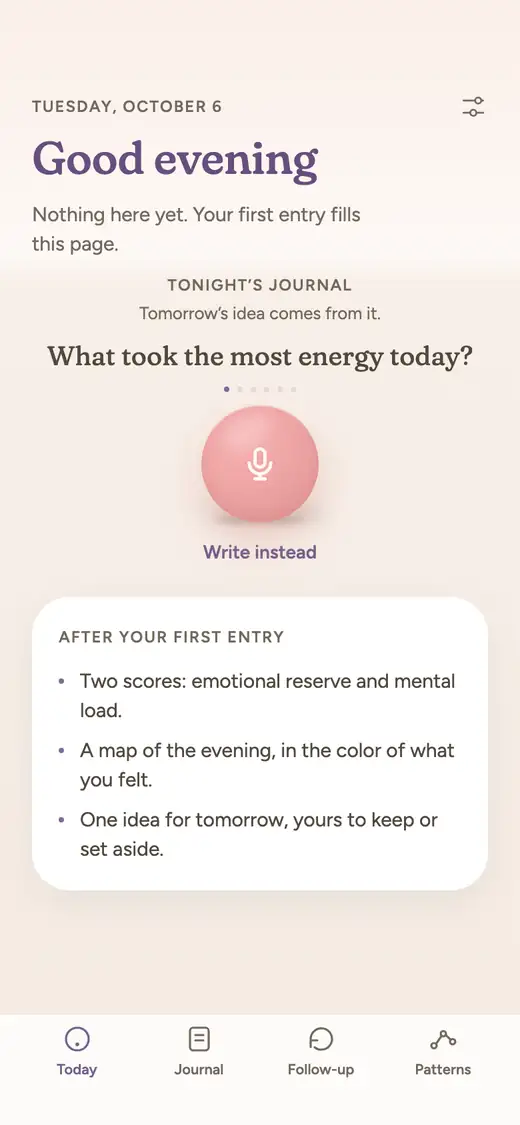
Day One is a long-running journal app for writing, photos and a lifetime archive, free at the base level, with paid plans that add audio and an AI chat. Leeway is new and opening soon on iPhone: a spoken evening check-in that names what you felt, shows reserve and load, and keeps one small step. Leeway is not released yet.
Day One is a long-running journaling app, with more than a decade of updates behind it according to its App Store page. It works on many platforms, and its top plan now includes an AI chat. Leeway is a new player, about to launch on iPhone, and it is much narrower: a couple of minutes of talking each evening.
We build Leeway and want you to know that before you read on. Our facts about Day One come from its website, its pricing page, its help guides and its US App Store page, read on October 17, 2026. Leeway is not released yet, opens soon on iPhone, and has no date or price announced.
Day One is built to hold a life: years of entries, photos and places, searchable and printable. Leeway is built for something shorter: to help you put down the day, see how much room you have left, and leave with one small step for tomorrow.
At a glance
| Leeway | Day One | |
|---|---|---|
| How you journal | Answer one evening question out loud for a couple of minutes, morning or evening. Writing works too. | Write entries with photos, video, drawings, audio and templates, or start from a daily prompt. |
| Voice | Voice first. Talking is the main way to make an entry. | Audio recording and transcription on Silver and Gold. Gold adds a Daily Chat with a spoken Voice Mode. |
| What you get after an entry | A title for your evening, your emotional reserve (the room you have left), your mental load (what is still turning), and a reflection in your own words. | Your entry, saved and searchable. On Gold, entry summaries, title suggestions and Go Deeper prompts. |
| Naming emotions | An AI names the emotion in your voice and in your words. You do not have to name anything, and you can correct it. | No emotion feature on its plans page. On Gold, Daily Chat entries capture your words and mood, per its Gold page. |
| Over time | Follows your reserve and load from one entry to the next. After a few weeks, Patterns shows what weighs on you and what helps, and says so when there is not enough to tell. | On This Day memories, calendar, map and media views, and a record of the days you journaled. On Gold, Daily Chat builds a memory of what you share. |
| Something to do next | One small step for tomorrow, drawn from what you said. Try it, swap it, or set it aside. It waits for you in the morning. | Daily prompts, reminders and, on Gold, personalized prompts. No suggested action after an entry. |
| Platforms | iPhone first. | iPhone, iPad, Apple Watch, Mac, Android, Windows and web. |
| Price | Not announced yet. | Basic: $0. Silver: $49.99 per year. Gold: $74.99 per year, with a one-month free trial in the app. |
| Availability | Not released yet. Waitlist open. | Available now on the App Store, Google Play, the Mac App Store, the Microsoft Store and the web. |
Where Day One is strong
- A free Basic plan with unlimited text entries and unlimited journals, daily prompts, templates, search and On This Day memories.
- End-to-end encryption, passcode and biometric lock are listed on every plan, including the free one.
- Made for looking back: calendar, map and media views, tags, collections, shared journals and printed books.
- Broad platform reach: iPhone, iPad, Apple Watch, Mac, Android, Windows and the web, with unlimited device sync on the paid plans.
- Gold adds a Daily Chat with a spoken Voice Mode, plus summaries and personalized prompts, for people who want AI guidance on top of a classic journal. Day One says Daily Chat content is not used to train AI models.
What to keep in mind about Day One
- Writing is the foundation. Audio recording and transcription start on the paid Silver plan, and the spoken Daily Chat is part of Gold.
- Its plans page lists no emotion feature. Its Gold page says Daily Chat turns a conversation into an entry that captures your words and mood, but naming a feeling from the sound of your voice is not described.
- Basic is limited to one device and one photo per entry, so the free plan suits a simple text journal best.
- Its plans page describes prompts, summaries and reminders, and does not describe one suggested action for tomorrow after an entry.
Where Leeway is different
Built around speaking, not around an archive
Day One's strength is the archive: media, places and years of text. Leeway is not built around an archive. You answer one question out loud for a couple of minutes, which suits the nights when typing a proper entry feels like another task.
Naming the feeling is part of the entry
With Day One you describe the day yourself and add tags, or on Gold let Daily Chat shape a conversation into an entry. In Leeway, an AI names the emotion it hears in your voice and in your words, and you can correct it. The naming is something you receive, not something you have to do.
Two numbers instead of a timeline
Day One shows you the past through a calendar and a map. Leeway shows you two measures that change with each entry: your emotional reserve, the room you have left, and your mental load, what is still turning. Patterns then points to what weighs on you and what helps, once a few weeks of entries exist.
Tomorrow gets a small step
A Day One entry is a finished page, with prompts offered for the next one. A Leeway entry produces a title, a reflection in your own words and a single small step for tomorrow. Try it, swap it or set it aside, and find it waiting in the morning.
Which one to choose
Choose Day One if
You want a journal you will still be adding to in ten years, with photos, places, printed books and end-to-end encryption, on whichever devices you own. Start free with Basic, and move to Silver for audio or Gold for the AI chat if you want them. It is established, it runs on iPhone, Android, Mac, Windows and the web, and it is available now.
Choose Leeway if
You do not want to manage a journal at all. You want to talk for two minutes at night and get your feeling named, your reserve and load, and one small step. Leeway is new and not out yet, so there is nothing to download today. Join the waitlist and you will get one email when it launches on iPhone.
Questions
Is Day One free?
It has a free Basic plan with unlimited text entries and journals. Silver costs $49.99 per year and adds audio, more photos and unlimited devices, and Gold costs $74.99 per year and adds the AI features, according to its plans page. A one-month free trial is offered in the app.
Can I record my voice in Day One?
Audio recording and transcription are included from the Silver plan. Gold also has a Daily Chat with a Voice Mode, where you talk with an AI and then generate a written entry from the conversation.
Does Day One have AI?
Yes, on Gold: a Daily Chat, entry summaries, title suggestions, Go Deeper prompts and image generation. Its plans page notes that the AI features have daily usage limits, and its Daily Chat guide says your content is not used to train AI models.
Is Leeway an alternative to Day One?
For some people, as a different habit rather than a replacement. Day One keeps a life's worth of entries. Leeway is a short spoken evening check-in with a named feeling, two numbers and one small step.
Where can I get Leeway?
Leeway has not been released, so there is nothing to download yet. It opens on iPhone first. No price or date is announced, and the waitlist gives you one email at launch.