Journaling apps compared
Apple Journal vs Leeway
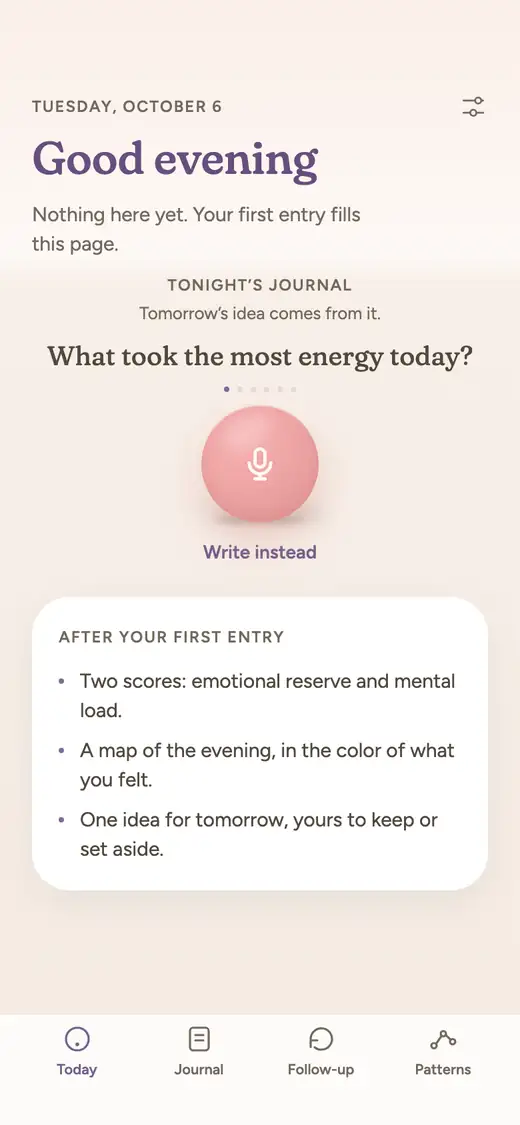
Apple's Journal app is free on iPhone and strong at capturing moments, photos, places and audio, with suggestions to start from. Leeway is a new voice journal about to launch on iPhone: one evening question out loud, a feeling named, two numbers and one small step for tomorrow. Leeway is not released yet; Journal is available now.
If you own an iPhone, you already have a place to journal. Apple's Journal app is free, it keeps entries in iCloud, and it is where many people start. Leeway is a new app, about to launch on iPhone as well, and it asks a different thing of you: instead of writing up your day, you talk about it for a couple of minutes.
We make Leeway, which is why this page lists first what Journal does well. Everything about Journal comes from its US App Store page and Apple Support guides, read on October 17, 2026. Leeway is not released yet, opens soon on iPhone, and has no date or price announced.
These two apps solve different problems. Journal is a rich scrapbook for memories, with a few wellbeing touches. Leeway is a short spoken check-in for the end of the day, aimed at how you feel and what comes next.
At a glance
| Leeway | Apple Journal | |
|---|---|---|
| How you journal | Answer one evening question out loud for a couple of minutes, morning or evening. Writing works too. | Write entries with photos, video, places, music, drawings and audio, starting from suggestions or prompts. |
| Voice | Voice first. Talking is the main way to make an entry. | Record audio into an entry and have it transcribed, in English only per Apple's guide. You can add the transcript to the entry text. |
| What you get after an entry | A title for your evening, your emotional reserve (the room you have left), your mental load (what is still turning), and a reflection in your own words. | Your entry, saved and organized in iCloud. No written reflection on what you said is described. |
| Naming emotions | An AI names the emotion in your voice and in your words. You do not have to name anything, and you can correct it. | You log your own state of mind and can save it to the Health app. |
| Over time | Follows your reserve and load from one entry to the next. After a few weeks, Patterns shows what weighs on you and what helps, and says so when there is not enough to tell. | Calendar, search, Places view, and an Insights view of your journaling counts and days. |
| Something to do next | One small step for tomorrow, drawn from what you said. Try it, swap it, or set it aside. It waits for you in the morning. | Journaling suggestions, reflection prompts and, with Apple Intelligence, writing prompts as you write, plus reminders. No action suggested after an entry. |
| Platforms | iPhone first. | iPhone and iPad (17.2 or later) per its App Store page, which also says your journal syncs with Mac through iCloud. |
| Price | Not announced yet. | Free. |
| Availability | Not released yet. Waitlist open. | Available now on the App Store for iPhone and iPad. |
Where Apple Journal is strong
- Free, and made by Apple for iPhone, so there is no separate account to create and no subscription to compare.
- Suggestions to start from: moments built from your photos, places, workouts and media, so you do not begin with a blank page. Apple says suggestions use on-device intelligence and you choose what to enable.
- Rich entries: photos, video, drawings, handwriting, music, places and audio recordings can sit inside the same entry.
- Looks back well: calendar, search, a Places view, multiple journals and printing or export to PDF.
- Protected with Face ID, Touch ID or your passcode, and stored in iCloud, with export available from Settings.
What to keep in mind about Apple Journal
- Writing is the center of the app. Audio is something you add to an entry rather than the main way to journal, and Apple's guide says transcription is available in English only (excluding Singapore and India).
- Apple's pages describe no written reflection on what you said. With Apple Intelligence on supported iPhones, it can suggest writing prompts based on what you write.
- Emotions are something you log yourself: you can record a state of mind and save it to the Health app.
- Its insights are about your journaling habit, such as counts and days, and not about how much you have left or what is weighing on you.
Where Leeway is different
Talking is the whole entry, not an attachment
In Journal, you write and can add a recording. In Leeway, talking is the way in. One evening question, a couple of minutes aloud, and your entry is done. Nothing to format, and writing remains available when you cannot speak.
It reads your voice and words for the feeling
Journal lets you record how you feel. Leeway does the noticing: an AI names the emotion in your voice and in what you say, and you can correct it. You never have to scroll a list of moods to find the right one.
Reserve and load rather than counts of days
Journal's insights count how often you write. Leeway follows two things about you instead: the emotional reserve you have left and the mental load that is still turning. Over a few weeks, Patterns shows what weighs on you and what helps, and tells you when there is too little to say.
A reflection and a step, not just a saved page
A Journal entry stays as you wrote it. A Leeway entry returns a title for your evening and a reflection in your own words, then keeps one small step for tomorrow. You can try the step, swap it or leave it. It will be there when you pick up your phone in the morning.
Which one to choose
Choose Apple Journal if
You want a free, private place on your iPhone to keep memories with photos, places and drawings, and you are happy writing. It is already part of the Apple world, it syncs through iCloud, and its suggestions make starting easy. For a scrapbook of your life, it is hard to beat at that price.
Choose Leeway if
You want to talk for two minutes at night and get back what you felt, your reserve and load, and one small step for tomorrow. Leeway is new and not out yet, so Journal is the choice for today. Join the waitlist and you will get one email when Leeway launches on iPhone.
Questions
Can Apple Journal take voice entries?
You can record audio into an entry, and its App Store page says the recording is transcribed automatically. Apple's guide says transcription is available in English only (excluding Singapore and India locales), and you can add the transcript to the entry text. The app is organized around writing, with audio as one of several things you can attach.
Is Apple Journal free?
Yes. It is listed as a free app on the US App Store, and its page shows no in-app purchases.
Does Apple Journal analyze how I feel?
Its App Store page describes logging your state of mind and saving it to the Health app. With Apple Intelligence on supported iPhones, it can suggest writing prompts from what you write, but Apple does not describe an analysis of how you feel.
Is Leeway meant to replace Apple Journal?
Not necessarily. They do different jobs. Journal keeps moments and media. Leeway is a short spoken evening check-in that names what you felt and leaves you one small step. Some people may use both.
Is Leeway available yet?
No. Leeway is new and unreleased, and it opens on iPhone first. Its price and date have not been announced. The waitlist sends one email when it is ready.