Journaling apps compared
Best voice journal apps
Untold is the closest to a pure voice journal available today, and Reflection adds a live spoken back-and-forth and a free plan. Apple Journal is a free way to attach audio to an entry. Leeway is a new voice journal about to open on iPhone: you answer one evening question aloud and leave with one small step. Join the waitlist.
Voice journaling means different things from one app to the next. In some, speaking is the whole design. In others it is a microphone button beside a text box, or an audio file attached to an entry. This list looks at how each app handles the voice itself, and at what you get once you stop talking.
Leeway is new and opening soon on iPhone, with no date or price announced yet. We build it, so it sits first as the newcomer to watch, and we describe it only by what it is designed to do. The other five apps are available now. We read each one's own site and App Store page on October 17, 2026, and where a fact was not stated there, the table says so.
The picks
Leeway
Best for talking through your evening and leaving with one small step
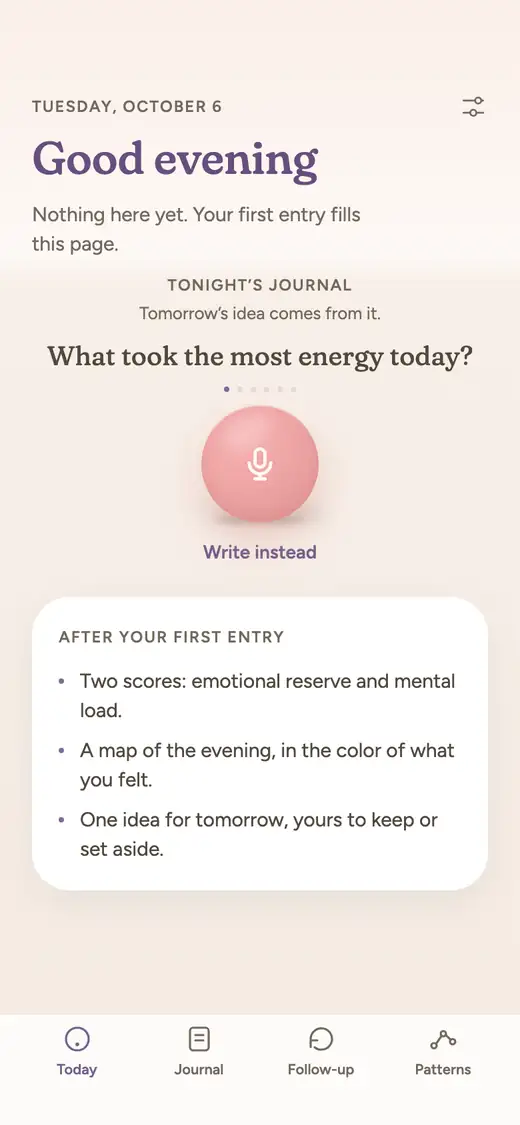
Leeway is new and opening soon on iPhone, with no date or price announced. Talking is its main way in: one evening question, a couple of minutes aloud, and writing if you prefer. It names what you felt from your voice and words, shows your emotional reserve and mental load, and keeps one small step for tomorrow.
Untold
Best for a voice-first journal that asks follow-up questions as you talk
Untold describes itself as an AI voice journal. You speak, it transcribes, and it asks optional questions as you go. Around each entry it offers Perspectives, guided journals and meditations built from what you said.
Good at
- Talking is the main way in, with a writing mode for the days you would rather type
- Its site says all entries are encrypted and that you can export or delete your journal at any time
- Optional follow-up questions arrive while you speak, so you are not left with a silent microphone
- Ask Your Entries lets you put a question to your own journal and get an answer drawn from what you shared
- Its App Store release notes describe Home and Lock Screen widgets and a CarPlay interface for journaling on the move
Keep in mind
- Its pages describe themes, trends and a mood calendar, but not an emotion named for you from your voice
- The output is insight, questions and content; a single small step to carry into tomorrow is not described
- Its App Store page lists English as its only language, and its site does not state prices
Reflection
Best for talking things through out loud, on any device, with a free plan to start
Reflection gives you two ways to speak: tap the mic and your words become a searchable entry, or start a Voice Call and have a spoken back-and-forth that is saved to your journal as a transcript. An AI coach then offers a follow-up question taken from what you wrote.
Good at
- Voice Call is a live conversation: it listens, answers aloud, and files the whole transcript in your journal
- One journal syncs across iPhone, iPad, Mac, Android and the web, which suits people who switch devices
- Entries can be imported from Day One or a CSV file and exported to PDF, JSON or CSV
- Ask Your Journal answers questions about your own history in plain language
Keep in mind
- Voice sits beside a full editor with photos, templates and guided journeys, so talking is one door in rather than the whole design
- Its Insights page charts sentiment and an emotional landscape over time, but naming a feeling from your voice is not described
- After an entry you get a coach question; a step set aside for the next morning is not listed
Rosebud
Best for voice entries inside an AI journal that remembers what you told it
Rosebud is an AI journal that responds as you write or speak. Voice entries use transcription or a hands-free voice mode, and it can read its replies back to you. It keeps a long-term memory of what you share and sends a weekly report.
Good at
- A hands-free voice mode lets you keep talking, with an auto-stop setting you can tune from low to high sensitivity
- A glossary of up to ten names or words keeps them spelled correctly in your transcripts
- Replies can be played aloud in a voice you choose in your settings
- An evening reflection built on three questions: a highlight, a source of tension, and something new you learned
Keep in mind
- Voice is one input in a broad product that also covers goals, habits and guided journals
- Its help center says the free plan is retired effective September 30, 2026, though its home page still says Rosebud is free to use
- Suggestions are framed as habits and goals; one small step drawn from that evening is not described
Apple Journal
Best for a free place to attach a recording to an entry on your iPhone
Journal is Apple's own app. You can record audio straight into an entry and have it transcribed, alongside photos, places and a state-of-mind log. It leans on suggestions drawn from your day rather than on a spoken conversation.
Good at
- It costs nothing, and a touch-and-hold on the Home Screen icon offers Record Audio
- The recording stays attached to the entry, and you can add its transcription to the text
- Suggestions built from photos, workouts, places and media help you start an entry; Apple Intelligence adds writing prompts on supported devices
- You can log your state of mind to the Health app, and lock the journal with Face ID, Touch ID or your passcode
Keep in mind
- Transcription is available in English only, excluding Singapore and India, according to Apple's guide
- Nothing is written back to you about what you said; the help is limited to writing prompts
- Its Insights view covers journaling habits and stats rather than emotional patterns, and no Android or web version is listed
Day One
Best for a long-term journal where audio sits beside photos, video and text
Day One is a journal built around rich entries. Audio recording and transcription belong to its paid Silver plan, where voice works as another attachment to an entry. Its AI tools are on the Gold plan, including Daily Chat with a spoken Voice Mode.
Good at
- Audio recording with transcription sits alongside photos, video, drawings and scanned pages in one entry
- The free Basic plan keeps unlimited text entries, daily prompts and end-to-end encryption
- It runs on iPhone, iPad, Mac, Apple Watch, Android and the web, and offers printed journals
Keep in mind
- Audio and transcription start at the Silver plan; the free Basic plan does not list them
- Outside Gold's Daily Chat, voice is an attachment to a page you still fill, not the main way to journal
- A suggested step for tomorrow is not listed on any plan, and its reflection tools sit in the Gold tier
At a glance
| Leeway | Untold | Reflection | Rosebud | Apple Journal | Day One | |
|---|---|---|---|---|---|---|
| How you journal | Answer one evening question out loud for a couple of minutes, morning or evening. Writing works too. | Speak an entry, or switch to writing mode. Optional questions appear as you go. | Write, tap the mic to dictate, or start a Voice Call. Templates and 100+ guided journeys are there too. | Write or speak. Guided journals, a morning intention and an evening reflection are included. | Write, add photos, video, places or handwriting, or record audio into an entry. | Write, with photos, video, drawings and audio. Daily prompts and templates are included. |
| Voice | Voice first. Talking is the main way to make an entry. | Voice first, with speech-to-text transcription and a writing mode. | Dictation turns speech into a clean entry. Voice Call speaks back in real time and is listed for iPhone, iPad and Android. | Voice transcription and a hands-free voice mode. Its App Store listing cites 20 languages. | Audio recording with transcription, English only (excluding Singapore and India). | Audio recording and transcription from the Silver plan. On Gold, Daily Chat has a spoken Voice Mode. |
| What you get after an entry | A title for your evening, your emotional reserve (the room you have left), your mental load (what is still turning), and a reflection in your own words. | Personalized insights, Perspectives through different lenses, and a feed of content based on your entries. | A coach question drawn from the entry, plus weekly and monthly reviews. | A reflection on the entry with follow-up questions, plus a weekly report. | No reflection is written back; suggestions and prompts help you begin the next entry. | On Gold: Daily Chat, Go Deeper prompts, entry summaries and title suggestions. |
| Naming emotions | An AI names the emotion in your voice and in your words. You do not have to name anything, and you can correct it. | Not described as naming an emotion; the app shows a mood calendar and visual trends. | The Insights page shows sentiment over time and an emotional landscape by energy and positivity. | Its listing describes an AI mood tracker, and the weekly report maps an emotional landscape. | You can log a state of mind, which is saved to the Health app. | Not described as a feature. |
| Over time | Follows your reserve and load from one entry to the next. After a few weeks, Patterns shows what weighs on you and what helps, and says so when there is not enough to tell. | Visual Trends for recurring themes and emotional seasons, plus Ask Your Entries. | Insights, Ask Your Journal, and reviews each week and month. | Long-term memory, pattern recognition across entries, and a weekly report with themes and mood trends. | An Insights view for habits and stats, with calendar and places views. | On This Day memories, search and filters, and a map view. |
| Something to do next | One small step for tomorrow, drawn from what you said. Try it, swap it, or set it aside. It waits for you in the morning. | Daily practices such as weekly intentions and gratitude, and guided journals. | Coach questions, guided journeys, and growth opportunities on the Insights page. A single step for the next day is not described. | AI habit and goal suggestions. No single step per evening is described. | Not described. Suggestions help you start entries. | Daily prompts and reminders. No suggested step is described. |
| Platforms | iPhone first. | iPhone and iPad on the App Store, and Android on Google Play. The App Store page also lists Mac (Apple silicon) and Apple Vision. | iPhone, iPad, Mac, Android and web. | iPhone, iPad, Android and web. | iPhone and iPad per its App Store page; entries sync with Mac through iCloud. | iPhone, iPad, Mac, Apple Watch, Android, Windows and web. |
| Price | Not announced yet. | Free to download. Premium is listed at $12.99 per month or $107.99 per year on the App Store. | A free plan exists. Premium is $8 a month, or $5.75 a month when billed yearly, with a 7-day free trial. | Rosebud Bloom: $12.99 a month, or $107.99 a year, on its home page. | Free. | Basic is $0. Silver is $49.99 a year and Gold is $74.99 a year, with a 1 month free trial in the app. |
| Availability | Not released yet. Waitlist open. | Available now on the App Store and Google Play. | Available now on the App Store, Google Play and the web. | Available now on the App Store, Google Play and the web. | Available now on the App Store. Requires iOS 17.2 or later. | Available now on iPhone, Android, Mac, Windows and the web. |
Why Leeway is first on our list
One question instead of an open microphone
In many voice journals the hard part is deciding what to say. Leeway asks one evening question and you answer it out loud for a couple of minutes, so there is no blank page and no empty recording to fill. Writing works too, on the evenings you would rather type.
The feeling is named for you
Several apps here transcribe what you say and leave the feeling to you. Leeway's AI names the emotion it hears in your voice and in your words, and you can correct it. You do not have to find the word first.
Two numbers that move
After each entry Leeway shows your emotional reserve, the room you have left, and your mental load, what is still turning. Both are followed from one evening to the next. After a few weeks, Patterns shows what weighs on you and what helps, and says so when there is not enough to tell.
A step that waits in the morning
A transcript, however accurate, is still only what you said. Leeway draws one small step for tomorrow from it. You can try it, swap it or set it aside, and it waits for you in the morning.
Which one to choose
Choose Untold, Reflection or Rosebud if
You want to start journaling by voice today. Untold makes speaking the default, Reflection talks back in a live Voice Call and has a free plan, and Rosebud adds a hands-free voice mode inside a journal that remembers you. If all you need is a recording attached to an entry, Apple Journal is free and Day One keeps audio beside photos, with a spoken AI chat on Gold.
Choose Leeway if
You want to say how the evening went in a couple of minutes and get something back: the feeling named, your reserve and load, and one small step for the morning. Leeway is not out yet, so the first move is small. Join the waitlist and you will get one email when it opens on iPhone.
Questions
What is the best voice journal app?
It depends on how you want to use your voice. Untold is built around speaking, Reflection offers dictation and a live spoken conversation, Rosebud has a hands-free voice mode, Apple Journal and Day One attach audio to entries, and Day One Gold adds a spoken AI chat. Leeway, which is not released yet, is designed around answering one evening question out loud.
Can I journal by voice for free?
Apple Journal is free and records audio with English transcription. Reflection has a free plan, though its pages do not say which voice features that plan includes. Day One lists audio from its paid Silver plan. Untold is free to download with a Premium subscription, and Rosebud's help center says its free plan is retired.
Do voice journal apps keep my recording or only the text?
It varies. Apple Journal keeps the recording attached to the entry, and Day One stores audio recordings on its paid plans. Untold and Reflection describe transcribing your speech into an entry; whether the audio itself is kept is not clearly stated on the pages we read. Check an app's privacy page before you rely on it.
Is talking to a journal better than writing?
Neither is better for everyone. Speaking removes the blank page and can be quicker, while writing gives you text you can edit as you go. Several apps here offer both, and Leeway lets you write when you prefer.
When can I try Leeway?
Leeway is not released yet and opens on iPhone first, with no date announced. Join the waitlist and you get one email when it does.