Journaling apps compared
Rosebud alternatives
If Rosebud's price or format is not right for you, Reflection is the closest match and has a free plan, Mindsera leans on analysis, and Untold makes voice the default. Life Note and How We Feel differ in kind. Leeway is a new voice journal opening soon on iPhone, and not out yet. Join the waitlist.
People look for Rosebud alternatives for a few reasons: the price, the end of its free plan, a wish to talk instead of type, or a preference for less AI conversation. Rosebud's help center says its free plan is retired effective September 30, 2026, while its home page still says Rosebud is free to use and lists Rosebud Bloom at $12.99 a month or $107.99 a year.
The five apps below each differ from Rosebud in a specific way, which we say plainly. Leeway, which we build, is new and opening soon on iPhone, so it appears first as the option to watch. It is not out yet and no price is announced. Facts come from each app's own pages, read on October 17, 2026.
The picks
Leeway
Best for talking through your evening and leaving with one small step
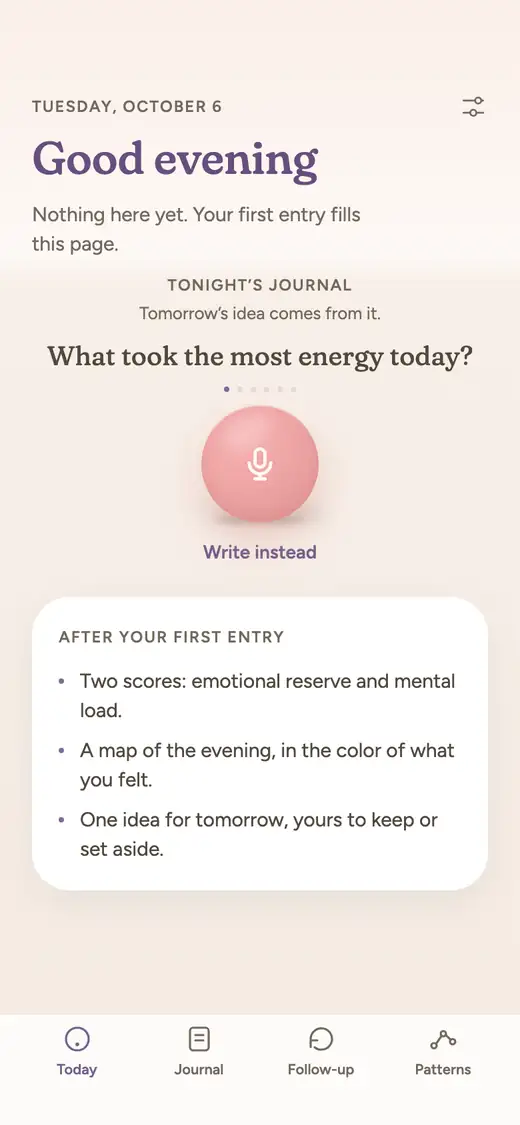
Leeway is new and opening soon on iPhone, with no date or price announced yet. Rosebud describes itself as a companion that learns from your entries; Leeway is a short evening loop. You answer one question aloud, it names what you felt and shows your emotional reserve and mental load, and you leave with one small step for tomorrow that waits in the morning.
Reflection
Closest in spirit: an AI coach and journal-wide search, with a free plan
Reflection is the nearest match if you like Rosebud's follow-up questions. A coach asks something drawn from your entry, you can search and question your whole journal, and it runs on phone, Mac and web.
Good at
- It has a free plan, so you can judge the coaching before paying anything
- Premium is listed at $8 a month, below Rosebud's monthly price
- Spoken Voice Call and dictation are both there if you want to talk instead of type
- Import from Day One or CSV files makes moving an existing journal straightforward
Keep in mind
- Its recaps are described as weekly and monthly reviews; a detailed weekly report like Rosebud's is not described
- Its coach is a question after you write, and it does not set a step for the next morning
- Cross-device syncing without limits requires Premium
Mindsera
A fit if you want analysis of your emotions and topics more than conversation
Mindsera swaps Rosebud's conversational feel for analysis. Each entry gets a breakdown, and the app tracks emotions, recurring topics and a personality profile across your whole journal. A free plan covers basic journaling and templates.
Good at
- Emotion analysis on the Genius plan, charted over time and based on Plutchik's model according to its App Store text
- A free Curious plan includes basic journaling, habit tracking and more than 50 framework templates
- Voice mode and call mode are listed on the paid plan for people who prefer speaking
- Handwritten pages can be scanned into text
Keep in mind
- The paid Genius plan is $14.99 monthly, which is above Rosebud's monthly price
- AI features are optimized for English, according to its FAQ
- It reads like a thinking tool; there is no single suggested step for tomorrow morning
Untold
A fit if you chose Rosebud for voice and want it to be the main event
Untold makes speaking the default and typing the alternative. Optional questions come up while you talk, and each entry feeds trends, guided journals and a feed of Perspectives. It is on the App Store and Google Play.
Good at
- Voice is the starting point rather than a mode, with a writing mode for the days you would rather type
- Visual Trends and a mood calendar show themes and emotional seasons across entries
- Guided journals and daily practices give structure to people who do not like a blank page
- A CarPlay interface and widgets are described in its App Store release notes
Keep in mind
- Premium is $12.99 monthly or $107.99 yearly on the App Store, matching Rosebud's listed prices
- Its App Store page lists English as its only language
- A named emotion or a single next step after an entry is not described
Life Note
A fit if you want a different voice answering back: thinkers, not a coach
Life Note replaces the single AI companion with mentors inspired by thinkers from philosophy, psychology, science and the arts. You write, a mentor answers in character, and the replies build on earlier entries.
Good at
- The mentor format is unlike anything else in this list, with more than 1,000 to choose from
- Free accounts can try it: 10 entries with a mentor reply in week one, then 3 a week
- Premium is $10.99 monthly or $99.99 yearly in the US, below Rosebud's monthly price
- It runs on iPhone, Android and the web
Keep in mind
- Replies are written as a mentor in character, not as a plain reflection of what you said
- Voice is limited to dictation into an entry
- Its site describes an emotion weather map, but not a feeling named from your voice, a measure such as reserve and load, or a single next step
How We Feel
A fit if you want to name feelings without AI conversation, and pay nothing
How We Feel is a free app from a nonprofit, conceived in conjunction with Yale University's Center for Emotional Intelligence. You check in by finding the word for how you feel, and it offers short video strategies. It is a check-in tool, not an AI conversation.
Good at
- It is free, with no subscription listed, and its App Store text says donations make that possible
- It helps you find the right word for a feeling, based on the work of Dr. Marc Brackett
- Sleep, exercise and health trends from HealthKit sit beside your check-ins to help you spot patterns
- Its App Store description says your data stays on your device unless you opt in to share anonymized check-ins
Keep in mind
- Its pages describe no AI reflection written back to you about what happened
- You pick the word yourself; nothing names it from what you say
- Its App Store page lists English and Spanish as its languages
At a glance
| Leeway | Reflection | Mindsera | Untold | Life Note | How We Feel | |
|---|---|---|---|---|---|---|
| How you journal | Answer one evening question out loud for a couple of minutes, morning or evening. Writing works too. | Write or dictate; guided journeys and templates help you begin. | Write, speak or scan; templates cover decisions, gratitude and more. | Speak first, or write; optional questions come up as you go. | Write an entry, or dictate it, and a mentor replies. | Daily check-ins where you find a word for how you feel; a friends feature shares it. |
| Voice | Voice first. Talking is the main way to make an entry. | Dictation and a live Voice Call. | Voice mode and call mode on Genius. | Voice first, with speech-to-text transcripts. | Dictation only. | Not stated. |
| What you get after an entry | A title for your evening, your emotional reserve (the room you have left), your mental load (what is still turning), and a reflection in your own words. | A follow-up coach question and periodic reviews. | Entry analysis, summaries and artwork. | Insights, Perspectives and generated content from your entries. | Mentor reply, weekly letter, portrait and art. | Short video strategies to try in the moment. |
| Naming emotions | An AI names the emotion in your voice and in your words. You do not have to name anything, and you can correct it. | Sentiment and an emotional landscape in Insights. | Emotions detected from your writing, charted over time. | A mood calendar and trends; naming is not described. | Mood logging, and an emotion weather map over time. | You choose from named feelings. |
| Over time | Follows your reserve and load from one entry to the next. After a few weeks, Patterns shows what weighs on you and what helps, and says so when there is not enough to tell. | Insights, search and reviews. | Recurring topics, long-term emotion trends and a weekly email. | Visual Trends and Ask Your Entries. | Mentors build on earlier entries. | Check-in patterns, with sleep, exercise and health trends from HealthKit. |
| Something to do next | One small step for tomorrow, drawn from what you said. Try it, swap it, or set it aside. It waits for you in the morning. | Growth opportunities on its Insights page. No single step for the next day is described. | Personalized suggestions. | Weekly intentions and gratitude practices. | A daily prompt from your mentor. | Video strategies under four themes: Change Your Thinking, Move Your Body, Be Mindful and Reach Out. |
| Platforms | iPhone first. | iPhone, iPad, Mac, Android and web. | iPhone, Android and web. | iPhone, iPad and Android. The App Store also lists Mac (Apple silicon) and Apple Vision. | iPhone, Android and web. | iPhone (iOS 17 or later) and Apple Vision on the App Store, and Android on Google Play. |
| Price | Not announced yet. | Free plan; Premium $8 monthly, or $5.75 monthly on the yearly plan. | Free Curious plan; Genius $14.99 monthly or $129 billed yearly. | Free to download; Premium $12.99 monthly or $107.99 yearly on the App Store. | Free to start; Premium $10.99 monthly or $99.99 yearly. | Free, made possible by donations. |
| Availability | Not released yet. Waitlist open. | Available now. | Available now. | Available now on the App Store and Google Play. | Available now. | Available now on the App Store and Google Play. |
Why Leeway is first on our list
A short loop instead of an ongoing companion
Rosebud describes itself as a companion that remembers what you share and learns from your entries. Leeway is narrower: one evening question, a couple of minutes out loud, and you are finished. It suits people who want a closing ritual for the day more than a continuing exchange with an AI.
Reserve and load, not a mood trend
Rosebud's weekly report maps an emotional landscape and mood trends. Leeway shows two numbers after every entry: your emotional reserve, the room you have left, and your mental load, what is still turning. You see them move from one evening to the next.
The emotion is named, and you can disagree
Leeway's AI names the emotion in your voice and in your words, so you do not have to pick a label first. If it gets one wrong, you correct it. That is also the contrast with How We Feel, where you choose the word yourself.
One step, not a list of goals
Rosebud suggests habits and goals. Leeway keeps a single small step drawn from what you said that evening. You can try it, swap it or set it aside, and it is waiting for you in the morning.
Which one to choose
Choose Reflection, Mindsera, Untold, Life Note or How We Feel if
You like the idea of Rosebud but not its price or format. Reflection is the nearest match and starts free, Mindsera focuses on emotion and topic analysis, Untold puts voice first, Life Note answers as a thinker, and How We Feel is free and helps you name feelings without an AI conversation. Each is available today.
Choose Leeway if
You want something lighter than a long-running AI relationship: a couple of minutes of talking each evening, a named feeling, two numbers and one small step. Leeway is not out yet. Join the waitlist and you will get one email when it opens on iPhone.
Questions
What is the best alternative to Rosebud?
Reflection is the closest in approach, with an AI coach, journal-wide search and a free plan. Mindsera suits you if you want analysis of emotions and topics, and Untold suits you if you want voice to be the default. Leeway is another option, but it is not released yet.
Is there a free alternative to Rosebud?
Reflection and Mindsera both list free plans, Life Note is free to start with weekly limits, and How We Feel is free. Check each plan on the app's site before you commit, because Rosebud's own change shows that free plans can end.
Is Life Note a good alternative to Rosebud?
It takes a different route. Instead of one AI companion it offers more than 1,000 mentors inspired by thinkers, and replies are written in their voice. If that appeals, it is worth a try. If you want a plain reflection of what you said, one of the other apps fits better.
Which Rosebud alternative lets me talk instead of type?
Untold is voice-first. Reflection offers dictation and a live Voice Call, and Mindsera lists voice mode and call mode on its paid plan. Leeway is also built around speaking, but it is not out yet.
When can I try Leeway?
Leeway is not released yet, and no date or price has been announced. It opens on iPhone first, and joining the waitlist gets you one email at launch.